Advanced Label Replacement with Tagsurance® 3

Oct 16, 2025

In RFID tag production, one thing is certain: there are always tag rejections, and the yield is never 100%. Failures happen; everyone in the industry knows it and must be prepared for it. However, the end customers justifiably have requirements for the RFID tag batch deliveries. The requirements can define the minimum yield, maximum allowed number of consecutive failed tags, or total maximum number of failed tags in each roll of tags. 

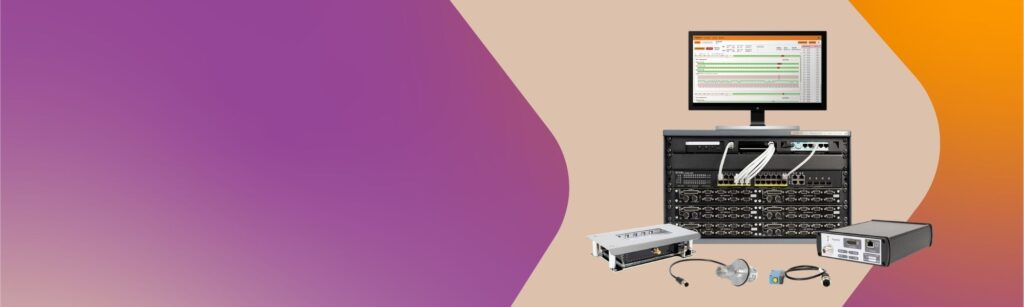
To meet these requirements, the tag manufacturer may sometimes need to replace failed tags with new ones. This replacement can be done as a separate process in a reel-to-reel machine or directly in the manufacturing machine, such as a converting line, at a ‘doctoring’ station. Advanced quality control is needed to make this process efficient and reliable. With Tagsurance 3 version 4.3.0, released on September 29, 2025, we introduced new features that help label manufacturers make the replacement process easier and more reliable while meeting customer quality requirements.

Stop Signal for the Machine Based on Test Result

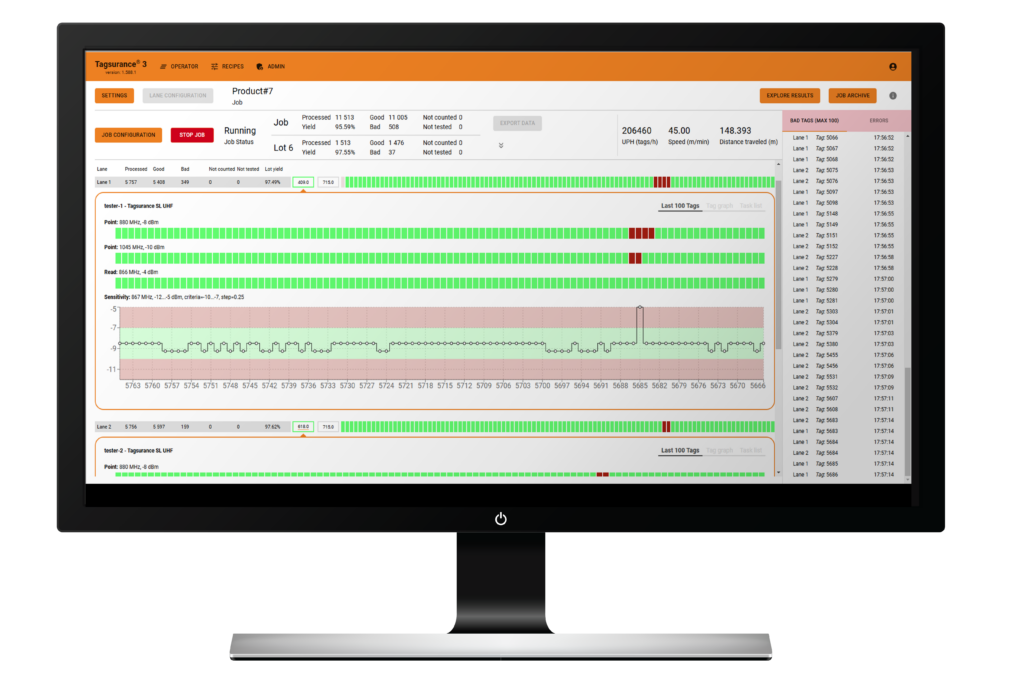
Based on the test results, Tagsurance 3 can now tell the machine to stop the lane when a replacement label is needed. When Tagsurance 3 is in charge of the lot management, manufacturers can implement the label replacement process on any machine that supports simple ‘slow down’ and ‘stop’ signals. This results in even more basic machines becoming compatible with advanced quality control workflows, as no built-in stopping logic is required. The user can define the result-based logic in Tagsurance 3.

Replacement Label TID Tracking: Keep Your Data Clean 

When tags are replaced, the original test results are no longer valid, and key statistics, such as yield, become inaccurate. For both the manufacturer and the end customer, it is essential that the reported results match the actual deliveries: the lot results must correspond precisely to the output tag reel.

With Tagsurance 3 integrated, the manufacturing process includes test stations both before and after the replacement location (the ‘doctoring’ station). As a standard feature, Tagsurance 3 enables the capturing and reporting of test results, data such as TID, and statistics as part of the lot results. The new improvement is that this same data can now also be captured for the replaced labels at the second test station. Lot management takes into account only the test station results after the replacement location, making the lot results accurate.

Watch the video to see how the advanced label replacement happens with Tagsurance 3.

Together with the stop signal feature, Tagsurance 3 can now provide a complete solution for quality control and label replacement process, as well as accurate encoding and batch data results.

Read more about the Tagsurance 3 lot data exporting capabilities: https://voyantic.com/blog/posts/improved-lot-data-export-during-test-runs/

Feature Update: Improved Lot Data Export During Test Runs

Aug 28, 2025

The number of RFID tags being produced has increased significantly in recent years, and the growth is expected to continue with the expansion of new application areas. As a result, the need for production speed, efficiency, and various levels of automation continues to grow. Production batches of RFID labels are now manufactured at an accelerating pace, creating greater demand for efficiency. At Voyantic, we continuously develop our systems to meet the future needs of the RFID industry.

With the latest software updates of Tagsurance® 3 (version 4.1.7 and up), we have improved how test data can be accessed and exported. Previously, the test data could only be exported after a job was completed or paused. Tagsurance would mark the transition between lots, but no batch-specific data could be accessed while the system ran. With the latest update, the system enables smooth exporting of lot-specific data even during an active run. Most importantly, you can now download a summary of the lot data—such as yield—during the production process. This makes it possible to review lot-specific performance in real time and, if necessary, mark certain rolls for rework if they don’t meet quality requirements.

Exporting batch results via browser UI while the job is running

While the top menu’s general “Export data” button remains inactive while the job runs, you can click the double-arrow icon to open the lot menu. By hovering over the desired lot, you can export data for that specific production batch while the run is ongoing.

The export function downloads a file package directly to the computer in use. The package includes test data in CSV format, containing the summary file and results for every individual tag tested, allowing for example, closer inspection of failed labels.

See below a short screen recording video demonstrating how the enhanced feature works in the browser UI

Exporting batch results via API while the job is running

With Tagsurance 3 version 4.1.7 (and up), the same new lot data export functionality is also available for customers using the API to export test data. 

Perform the lot data export following these steps:

1) Get the currently running job ID with calling status API `GET /v1/status`

2) Get jobs batches with batch stats API `GET /v1/jobs/{job id}/batch-stats`

3) Start batch result export by calling export `POST /v1/jobs/{job id}/batches/{batch id}/export`

4) Check that export is completed and ready for download by checking export status with status API `GET /v1/status`

5) Download the batch results zip file package

For a detailed demonstration or guidance on setting up API integration, don’t hesitate to contact sales@voyantic.com or support@voyantic.com.

Voyantic introduces reliable high-speed encoding into RAIN RFID converting and other machines with the Tagsurance® 3 system

Apr 11, 2025

Voyantic, a global leader in RFID testing solutions, is proud to announce the launch of the new encoding feature for Tagsurance 3 quality testing system. The latest software release enables encoding and quality control of RAIN RFID labels in high-speed production machines with a single system. 

As the demand for RAIN RFID labels is expected to grow exponentially, with billions produced annually, manufacturers need integrated, high-speed systems. The Tagsurance 3 system with encoding feature meets this demand, allowing seamless integration into production lines and eliminating the need for external encoding solutions. The Tagsurance 3 system is modular and scalable and can easily fit into various machine types. The user-friendly, browser-based operating UI helps with adoption at sites.

“At Voyantic, we are committed to delivering cutting-edge solutions that help our customers excel in RFID,” said Jukka Voutilainen, Voyantic’s General Manager. “This upgrade significantly enhances the Tagsurance 3 system’s capabilities, making it a powerful all-in-one solution for RAIN RFID inlay and label production.”

Uncompromised speed and reliability

The Tagsurance 3 system maintains high throughput without compromising the speed and efficiency of the production process. It supports encoding in high-speed machines and can even reach lane speeds for converting machines.

Additionally, the system’s reliability is paramount. Non-encoded, incorrectly encoded, or double-coded labels can create significant challenges for RAIN RFID users. To address this, the Tagsurance 3 system is designed for continuous, error-free operation during extended production runs, ensuring the highest reliability standard in large-volume manufacturing. 

Main specifications:

  • One encoding station per lane is supported
  • “BlockWrite” data to any writeable tag memory and lock the tag memories (Reserved, EPC, User)
  • Supported ISO 18000-63 (EPC Gen2v3) commands
    • BlockWrite
    • Lock
    • Read
  • 1-12 lanes
  • Lock the selected memories permanently
  • Verify the data is correctly encoded (Read test with verification)

The full specification is available in Tagsurance 3 product catalog.

The commercial release of the Tagsurance 3 encoding feature, available starting 10th of April, will be offered as a separate license on top of the existing Tagsurance 3 system. A hardware version 4.x is required to utilize this feature.

Save the date! We’re organizing a Tagsurance 3 encoding live demo on Wednesday, May 21, at 5 pm CEST / 10 am EDT. Register for the live webinar from here!

Tagsurance® 3 Online Connectivity Improves Usability and Maintenance

Mar 20, 2025

Voyantic recently launched a new version of the Tagsurance 3 system, an inline quality testing system for RFID tag production. With this update, we recommend that customers using the latest version (4.x) keep their systems always connected online. On the other hand, older versions (3.x) should still stay offline. But why the switch? And what benefits come with this new online connectivity?

Let’s dive in!

A screenshot of Tagsurance 3 Version 4.0 user interface.
A screenshot of Tagsurance 3 Version 4.x software user interface.

Cloud-based architecture enables future-proof quality management

With the new version, the Tagsurance 3 system’s architecture has been completely revamped under the hood. The Voyantic team has carefully designed this upgrade with the future and information security in mind. This release marks an important milestone, enabling safe network connectivity for the test system. Voyantic designs its systems using secure development best practices, and regular third-party audits ensure any identified issues are promptly addressed. 

The Tagsurance 3 Version 4.x with online connectivity paves the way for future possibilities, including encoding operations through the same setup. Enabling encoding will only require purchasing a software license, with no need for additional hardware upgrades.

Simpler, faster, and more efficient—whether it’s for daily use or maintenance tasks

Connecting the system to the internet is safe and recommended for unlocking a range of new features. Today, the concrete updates are most noticeable in the new browser-based user interface, which administrators and operators can access from any computer. Let’s examine the latest features designed to ease the system’s use.

1. Update software directly in the user interface

Gone are the days of downloading software update packages separately from voyantic.com and manually performing updates. With this new feature, admins can download and install the latest software versions directly from the user interface via the admin panel—as long as the system is connected to the internet. This ensures your system stays effortlessly updated with the latest features and improvements.

A screenshot from Tagsurance 3 4.x software showing what the releases page looks like.
Updating your Tagsurance 3 Version 4.x software has been made easy.

2. Simplified licensing

When your Tagsurance 3 version 4.x system is connected to the internet, it automatically connects to Voyantic’s license server and fetches the license information. Admin users can see all the essential details in the browser-based admin panel, including how long the license is valid, the number of lanes, and Tagsurance stations. It’s all there in one place, making it easy to manage your licensing.

3. Enhanced support

While we hope you don’t need to use this feature, we’ve significantly improved support for the new version. Suppose the system is connected to the internet, and you run into an issue. In that case, it’s now possible to download and send diagnostic files directly to the Voyantic support team through the admin panel. This helps speed up troubleshooting and resolution by providing our team with more accurate data with which to work. Ultimately, this reduces system downtime and takes the headache out of maintenance.

In summary

In the future, online connectivity of the new Tagsurance 3 version will open new business opportunities with the comprehensive management of quality data. Today, online connectivity improves usability and maintenance. It simplifies tasks, adds more features to the user interface, and provides a more efficient way to share information directly with Voyantic.

That said, online connectivity is still optional. Version 4.x systems can also operate offline like the 3.x systems. If you prefer to stay offline, you can still upload software releases and license files from a local computer through the admin panel.

Watch the recording below, where our Senior Product Manager Anirudh Wali demonstrates how the updated user interface and new features work in practice.

Presenting the New Snoop Pro 2.0

Mar 05, 2025

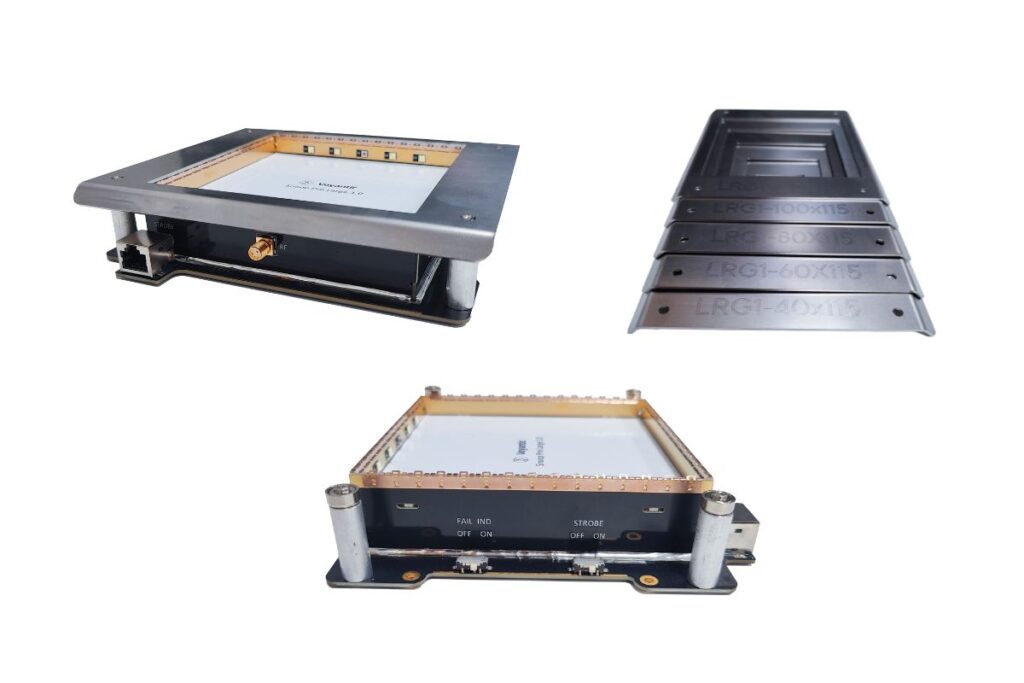
We continuously seek to improve our products to answer your needs, like making your job easier with user-friendly test systems or improving testing quality. This time, we made some nice improvements to Snoop Pro, one of the components used in the Tagsurance 3 system. The Snoop Pro 2.0 has:

  • Improved unit-to-unit RF performance variance
  • Integrated strobe feature
  • Smaller size and better usability

The improvements were made with backward compatibility in mind to make Snoop Pro 2.0 almost a drop-in replacement for Snoop Pro 1.x, which means:

  • RF backward compatibility: when testing tags/inlays, the test results with Snoop Pro 2.0 are within the test results variance of Snoop Pro 1.x
  • Mechanical backward compatibility: Snoop Pro 2.0 has the machine integration attachment holes at the same positions as Snoop Pro 1.x, and also the same shielding plates can be used

Let’s check it out.

Improved RF performance variation with RF backward compatibility

I’m starting with the RF performance because I just love RF. A nice new feature for the Snoop Pro 2.0 is the improved variance, making the produced units more uniform in RF performance. This means that if you test one tag with multiple different Snoop Pro 2.0, the results are very similar.

Illustrated example of the RF backwards performance.

Why is this so nice? I’m so glad I asked. It’s nice because if you want to use identical recipes for different production lines or even factories, the Snoop variance does not prevent doing that. So, better testing quality for your products. However, keep in mind that Snoop is only one of the components in the system; other things, such as the environment near the Snoop or cabling, might still have too much effect.

One of the most important requirements was the RF backwards compatibility so one can replace a Snoop Pro 1.x with the Snoop Pro 2.0 and be done with it. Our definition of RF backwards compatibility is as follows:

  • With the Snoop Pro 2.0, measured results are within the variance of Snoop Pro 1.x results OR within ±1.0 dB from the center of the Snoop Pro 1.x result envelope average

The difficult part is that the Snoop is always used with a tag/inlay on top of it and together they form a complex structure where every part plays a role. Since all tags/inlays are different and are affecting the Snoop differently, an excessive amount of measurements was performed to make sure we have covered most of the imaginable situations. Especially large tag models couple with the Snoop strongly and have an effect on the performance. Bah, physics and its precious laws.

Voyantic offers different kind of extensions for Snoops and those are compatible with the Snoop Pro 2.0. However, for the extensions there is no backwards compatibility in RF performance even though the results are close.

Integrated strobe feature

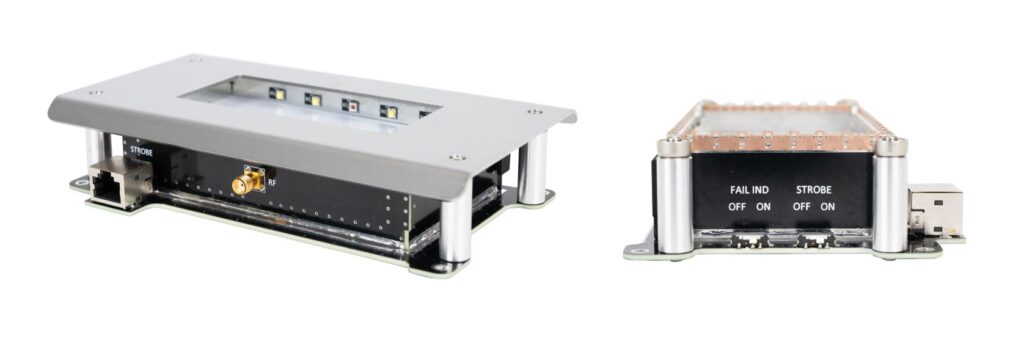
The Snoop Pro 2.0 has a built-in strobe functionality that can be turned on/off with a switch. White LEDs illuminate the trigger position (the moment when the testing/encoding starts), and red LEDs show tags/inlays that are failing the tests.

With the strobe light coming from below the material under test, the strobe is more effective than when the light comes from above. In a Tagsurance 3 system, the Snoop strobe shares a station connector with a TSU, so there’s no need to configure a new station to get it working. The Snoop Pro 2.0 can also be used without connecting the strobe cable; it does not affect the RF performance. The new RJ45 connector was added for the strobe functionality (don’t be fooled by the connector; no ethernet traffic there).

New size, looks, and usability

The Snoop Pro 2.0 no longer wears green; it now has a black-and-white appearance and a slightly reduced size. The new color was picked because of the integrated strobe functionality; white reflects the most light, which is essential for the strobe.

Snoop Pro 2.0 appearance.

With a careful redesign, we could replace the large external RF splitter and the two blue RF cables, making the size of the Snoop more compact. This helps a bit when trying to fit many Snoops in a multilane system where the space is limited.

The magnets were also renewed so less force is needed to change the shielding plate and you don’t not accidentally rip off the copper gaskets during the changing. Less hassle is always nice.

Conclusion

With the backwards compatibility, you can easily integrate the new Snoop Pro 2.0 to your testing systems. With the strobe integrated into the Snoop it is easy to use and doesn’t require additional configuration in the Tagsurance 3 recipe. The improved unit-to-unit variance allows you to more easily use identical recipes between lanes. All with the new Snoop Pro 2.0.

Voyantic Launches a New Version of Tagsurance® 3 System With Cloud-Based Features

Feb 28, 2025

Voyantic announces the launch of a new version of Tagsurance 3 system, an inline quality testing system for RFID tag production. The launch of Tagsurance 3 Version 4.x marks a significant upgrade to the previous version 3.x systems with exciting new capabilities and enhanced usability. This release introduces cloud-based features and lays the groundwork for future functionalities, including encoding operations using the same setup. 

The new Tagsurance 3 Version 4.x architecture is designed with the future in mind, unlocking powerful cloud-enabled features. The online connectivity streamlines maintenance work by enabling effortless software updates, simplified license renewals, and enhanced support: diagnostic data can be shared directly with the Voyantic support team for faster troubleshooting and minimized downtime. With this version, Voyantic recommends keeping Tagsurance 3 systems always online to fully leverage the benefits and ensure maximum system efficiency. 

Tagsurance 3 Version 4.x also introduces a new browser-based user interface, allowing operators to access the system conveniently from any computer. This eliminates the need for certain peripherals and allows users to connect to the system via a web browser for an intuitive and modernized user experience.

The update also provides a more compact hardware setup, reducing the footprint of controller racks. The new version uses the upgraded Lane Controller 2.0 and the new Server Panel.

Tagsurance 3 Version 4.0 offers backward-compatible APIs that ensure seamless integration with existing systems, safeguarding previous investments and reducing implementation time. Recipes created in previous Tagsurance 3 Version 3.x systems will also continue to work seamlessly, enabling a smooth transition without disrupting existing workflows.

Contact sales@voyantic.com for more information about upgrading your existing Tagsurance 3 system or starting your journey with Voyantic towards improved tag quality.

Voyantic Announces a New Version of the Snoop Pro™ For Enhanced Usability And Testing Accuracy

Feb 24, 2025

Voyantic introduces improved major version of its most commonly used coupling element Snoop Pro, which is a key component used in the Tagsurance 3® system. 

The latest Snoop Pro 2.0 model features several improvements, including elevated testing accuracy with reduced unit variance, an integrated strobe light, new LED controls, a new space-saving design, and improved shielding plate attachment for smoother handling.

This new version has been carefully developed with compatibility in mind. The previous element version can be easily upgraded, as RF and mechanical compatibility have been fully ensured. This seamless transition ensures that customers can enjoy the latest advancements without needing major system overhauls.

Voyantic continues to focus on innovation and reliability, delivering solutions that enhance the performance and ease of use for its customers.

Contact sales@voyantic.com for a quote for Snoop Pro 2.0 or to start your journey with Voyantic towards improved tag quality.
Tagsurance 3 product highlights from 2023 to 2024

Aug 23, 2024

It’s been a full year since we last shared the latest in our continuous journey of innovation with Tagsurance 3. Over the past year, we’ve been hard at work, rolling out several significant updates and enhancements. Now, let’s dive into the most noteworthy advancements that have propelled Tagsurance 3 forward!

Since our last update, Tagsurance 3 has evolved from version 3.5.0 to 3.12.0. That’s more than 10 releases packed with a combination of major feature introductions, minor enhancements, and diligent defect fixes. Our commitment to excellence ensures that every update enhances the accuracy and reliability of quality control for RAIN RFID product lines, from chip attachment and label converting to offline reel-to-reel items.

Here’s a quick overview of some of the most impactful and requested upgrades we’ve made to Tagsurance 3 over the past year:

Tagsurance has now improved tag response detection

Tagsurance SL UHF can consider a tag bad if the tag response is significantly weaker than the responses used to be for good tags tested by the same Tagsurance SL UHF tester. This response level detection, also called backscatter strength detection, improves the test result quality, especially in multilane processes. In the multilane process, the tester’s sensitive receiver may hear a tag response from the simultaneously tested neighbor tags, but this feature prevents a weak response from being interpreted as a good tag response.

Lot management-related improvements

Lot statistics (yield and tag counts) are shown for the current lot. The lot yield is also displayed per lane:

Screenshot from Tagsurance 3. Lot statistics per lane.

The completed lots are listed with counts and yields and the lot-specific results can be exported:

Screenshot from Tagsurance 3. The completed lists can be exported with counts and yields.

Support for external lot control via machine IO input: Tagsurance 3 supports an external signal for a lot change. It is possible for the production machine, e.g. turret rewinder, to give an IO signal when the liner is cut and the lot is changed. The lot change position is parametric in Tagsurance 3 and the position can be set according to the location where, for example, the liner is cut. The lot number is added to the tag results as before. When an external lot control is enabled, only a limited set of action triggers are available.

Screenshot from Tagsurance. Lot configuration.

Tagsurance has cut mark feature

Cut mark is a feature that separates lots visually from each other by the markers. Tags marked as cut marks are not counted in any lot.

Screenshot from Tagsurance. Lot configuration enabling cut mark support.

API trigger in Tagsurance

  • API trigger enables customers who integrate Tagsurance 3 via APIs to trigger any active device anytime. This feature is enabled only when a new type of job is running. When the API trigger is enabled, all other trigger sources are disabled and only a limited feature set is enabled.
  • Note: We also plan to bring this feature to operator UI shortly.

IO Only station enhancements 

Support for TAL15k jobs: Now three device types: Tagsurance SL UHF, Tagsurance HF, and IO-only devices can be used in systems using TAL15k or DDA serial interface, although one device type at a time.

The delay compensation for IO-only devices added:

Screenshot from Tagsurance 3. The delay compensation.

Tagsurance 3 can also support configuring if an IO-only station should return only a pass or fail signal. We have introduced a new configuration option for IO-only stations under lane configuration where an IO-only station can be configured to pulse on passing tags or pulse on failing tags. Users have the flexibility to set the deadline for waiting for a pulse. This can be either until the next trigger or a user-defined timeout value.

A screenshot from Tagsurance 3. IO-only station to pass or fail signal.

Puncher improvement

Tagsurance 3 can now configure a puncher-type station to adjust the puncher trigger pulse duration based on the distance in addition to time. Previously, the puncher station applied pressure against the tags based only on a fixed time duration.

Job archiving

The last 50 jobs (as long as 200 M results in total are not exceeded) can be stored and listed in the Operator UI and their CSV exports can be downloaded; note that the system automatically cleans up jobs from the oldest when the total number of jobs exceeds 50 or total number of stored results exceeds 200 million.

A screenshot from Tagsurance 3 what job archive looks like.

UX improvements

  • The speed value in the operator UI is shown in red when the machine runs backward and the speed is negative.
  • The Units Per Hour value is displayed in the operator UI. The UPH is calculated based on the past time window which can be configured in Tagsurance 3 settings.
  • In operator UI, users can increase the step size of fine-tuning offset by 0.5 mm (instead of the earlier 0.1 mm)
A screenshot from Tagsurance 3. What the fine-tuning off-set looks like.

Stay tuned as we continue to innovate and enhance Tagsurance 3. Our dedication to providing unparalleled quality control tools for the RAIN RFID industry remains unwavering. Thank you for being a part of our journey!

Notes: The latest Tagsurance 3 version 3.12.0 can be seen here.
If you’re interested in receiving product updates to your email, sign up here!

RAIN on Metal – How to Test the Performance of RAIN RFID Tag on Metal Plate

May 31, 2024

Although RFID and metal can be a challenging combination, tagging metal items with RAIN RFID will work as well as any other application, if you choose the right kind of tag designed for metal, and also plan the system and infrastructure carefully. On-metal tags are commonly used in industrial settings, where they need to endure harsh conditions and have reliable performance and readability. It’s great to see how the rapid development in specialty tags helps RAIN RFID usage expand in industries outside of retail. 

We often get asked for advice on testing tags on metal and other materials. So I decided to make an application note on how you can use Tagformance Pro to measure an on-metal tag attached to a metal plate, both inside and outside an anechoic chamber. I will also discuss the impact of the measurement environment on this application. The interesting question is to see how the performance of the tag change when attached to a metal plate, and how much the form factor of the metal plate has an effect.

In the tests, I used the Voyantic Tagformance Pro system and tested Confidex Silverline Blade printable on-metal labels with four different size metal plates.

The confidex tag used for testing

Download the Application Note for the Results and Method

To see the full measurement results and learn how I conducted the measurements, download the application note:

Download the Application Note

Key Findings

To intrigue your interest in taking a closer look at the application note, let me share some findings:

An on-metal tag on a metal plate is highly sensitive to the testing environment, especially outside of the chamber with external RF interference. Testing in an anechoic chamber is thus something I highly recommend for consistency in results.

What do you think? Are these results measured inside or outside of the C50 chamber?

Secondly, the size and shape of the metal has effects on the performance, thus making tagged-item testing a recommendable step for any metal item tagging project.

Setup for testing outside of the anechoic chamber.

Let us know if you have any questions about the application note or using Tagformance Pro for tag and tagged-item testing. We’re always happy to help.

Voyantic Announces the End-of-life Schedule for RFID Protocol Analyzer

May 17, 2024

Today Voyantic announces the end-of-life schedule for the RFID Protocol Analyzer product as follows:

End-of-Life Schedule

  • The last order date will be Sep 27th, 2024
  • Tech Support and spare part availability until the end of 2025
  • New software versions will not be released

For any questions, don’t hesitate to get in touch with your Voyantic Sales representative or send us a message ›